Assembly basic
Binary code was hard to read by human because it consists entirely instruction of 0 and 1, assembly language was developed as representative a human readable of machine code.
Unlike high level programming language, assembly operates at low level and closely tied to the hardware architecture. Learning assembly has many advantage especially for cyber security, optimization, hardware and gain deeper about system architecture.
In this blog we’ll covered basics of assembly.
📐 Architecture
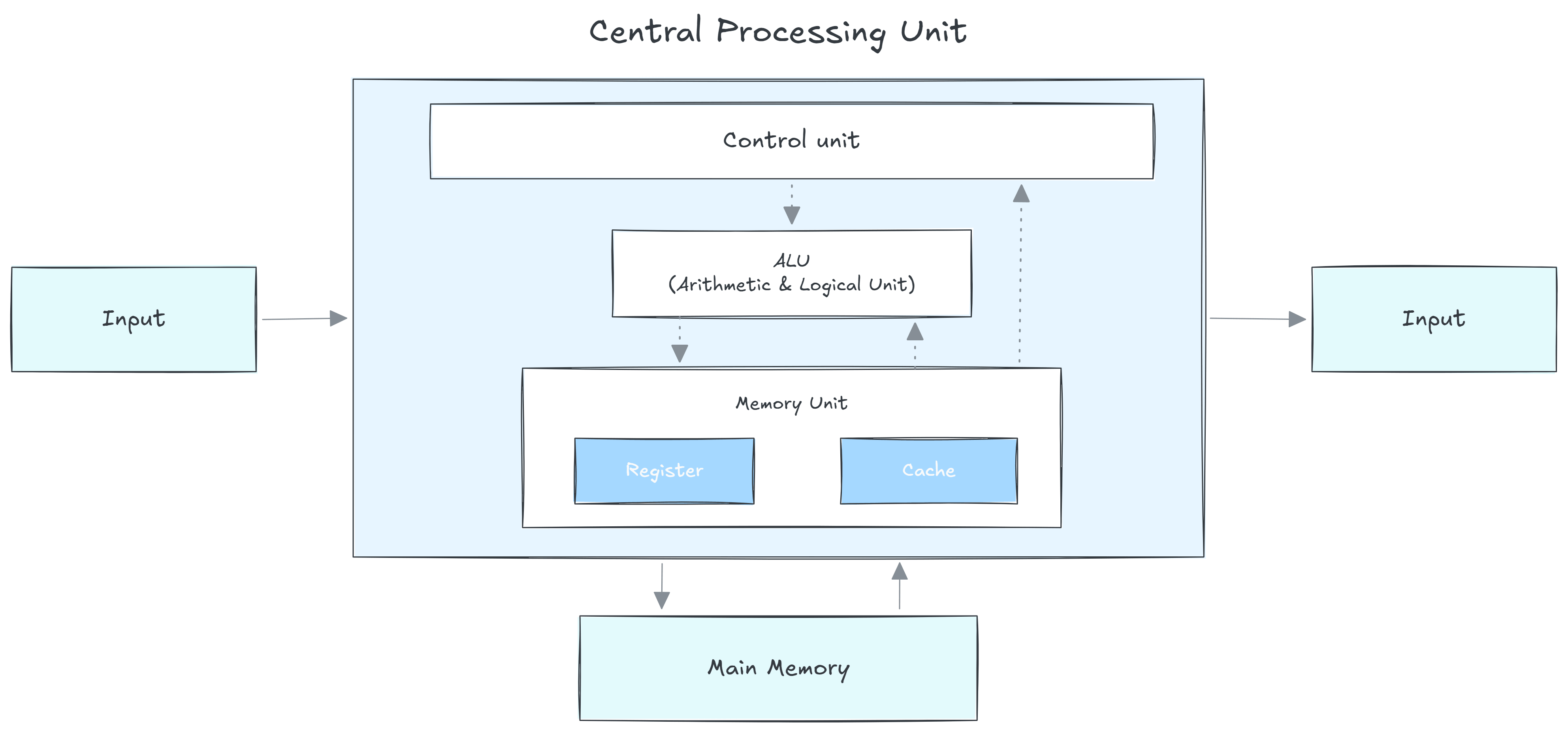
Assembly Instruction depends on processor Instruction Set Architecture (ISA), which defined the instruction, registers, memory model and other low-level feature available for programmers.
Processor commonly based on 2 type architecture that is RISC and CISC. While ISAs differ in their instruction sets and architecture, they all provide core concepts such as registers, stacks, memory operation and so on.
This blog posts tutorial focuses on x86_64, one of the most widely used architecture. You may also encounter other ISAs like ARM, MIPS, PTX, RISC-V and others.
🛠️ Toolchain
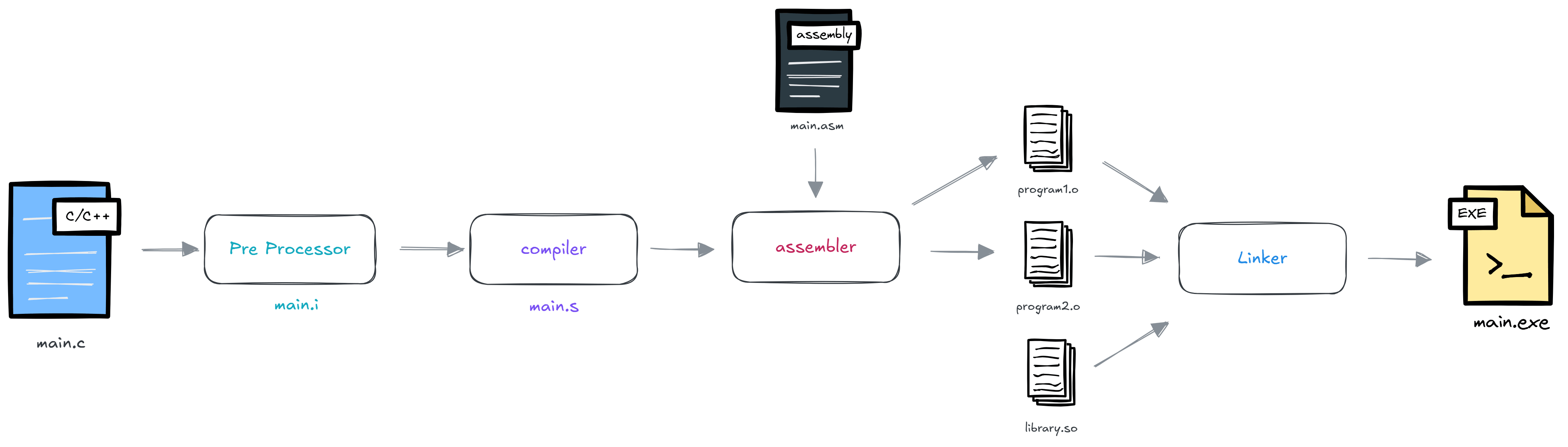
When writing assembly, the source code goes through several stages before it can executed by operating system. Understanding this toolchain is essential for programmer because it explains how source code is transformed into a runnable program and how software interacts with the operating system.
Assembler
The assembler translates assembly source code (.asm, .s) into machine code and produces an object file. There are several popular asssembler such as NASM, GNU Assembler (GAS) and MASM. For this example we will use NASM.
Object file
An object file contains machine code, symbol information, relocation data, and metadata generated by the assembler. Object files are not directly executable because some addresses and external references still need to be resolved. Common object file extensions:
- Linux
→ .o - Windows
→ .obj
Linking
The linker combines one or more object files and libraries into a final executable program. There are common linker like GNU ld, LLD and link.exe.
Executable
The final program that can be loaded and run by the operating system.
- Unix/linux
→ program - Windows
→ program.exe
Binary format
Different operating system use different executable file formats.
- Unix/linux
→ELF - Windows
→PE - MacOS
→Mach-O
Library
Library are collection of pre written code that you can reuse in your program. There are 2 type of library that is static lib and dynamic lib.
Static library will gets copied into your program at compile time. Common static lib formats:
- Unix/linux
→ .a(archive file) - Windows
→ .lib
Instead of compile time, Dynamic library will copied when program runs (runtime) and can be share to multiple programs. Common dynamic lib formats:
- Unix/linux
→ .so(share object) - Windows
→ .dll(dynamic link library) - MacOS
→ .dylib
💡 Concepts
Syntax
Assembly commonly have 2 type of syntax that is intel (destination, source) and AT&T (source, destination). The syntax is very depends on hardware architecture and assembler. In this tutorial we will use intel syntax because it easier to read.
Statement
Assembly program consist of 3 types of statements:
- Executable instruction
- tell the processor what to do, each instruction consists of operation code (opcode)
- Assembler directive (pseudo-ops)
- tell the assembler how to organize the program, reserve memory, define data, etc.
- Macros
- named block of assembly code that can be reused.
Each statement follow the format like this:
1
[label]   mnemonic   [operands]   [;comment]
The fields in the square brackets are optional the components are:
label→name of marking address in code/data (optional)mnemonic→the instruction nameoperands→parameters to the instruction (register, memory location, constant);comment→Human-readable note ignored by the assembler
Example:
1
loop_start:    add rax, 1      ; increment counter
Addressing mode
Addressing mode are the method for instruction uses to specify where it operands (data) is located.
To examine the addressing mode, we’ll use the mov instruction, which copies value in a register to memory or loads a value to a register from memory.
there is a common method in x86_64:
- Immediate addressing
- operands is constant value embedded in the instruction.
1
 mov rax, 42
- Register addressing
- The operand is stored in a register.
1
 mov rax, rbx
- Direct memory addressing
- The instruction contains a memory address.
1
 mov rax, [0x123abc]
- Register indirect addressing
- A register contains the memory address.
1
2
3
 ; rbx = 0x123abc
 ; rax ← contents of memory location 0x123abc
 mov rax, [rbx]
- Base + offset (displacement)
- Memory address is
base register + constant offset1 2
; address = rbp - 8 mov rax, [rbp - 8]
- Indexed addressing
- Memory address is
base + index1 2
; address = rbx + rcx mov rax, [rbx + rcx]
- Scaled indexed addressing
- Used heavily for arrays.
1
 mov eax, [rbx + rcx * 4]
Data type
Data type sizes vary based on architecture. These are the most common sizes you will encounter:
- Bit
→1 binary digit. Can be 0 or 1. - Nibble
→4 bits. - Byte
→8 bits. - Word
→2 bytes. - Double Word (DWORD)
→4 bytes. - Quad Word (QWORD)
→8 bytes. - Integer
→usually 32 bit, there 2 type signed and unsigned int. - Char
→1 bytes - Boolean
→1 bytes
Variable
Variable defined a named storage location that holds a value which can change during program execution.
Each variable follow the format like this:
1
[variable-name]    define-directive    initial-value   [,initial-value]...
There are 5 basic forms of the variable define directive:
DB→Define Byte (1 byte)DW→Define Word (2 bytes)DD→Define Double Word (4 bytes)DQ→Define Quad Word (8 bytes)DT→Define Ten Bytes (10 bytes)
example:
1
2
language  DB  'c'
nums      DW  12345
Constant
Unlike variable, Constant value doesn’t change during program execution.
There are 3 forms of the constant define directive:
equ→commonly used for defining constant.1
SYS_WRITE equ 4
%assign→same like equ constant but allow redifinition.1 2
%assign TOTAL 10 %assign TOTAL 20%define→this directive same like#definein c language. but you may define pointer1
%define PTR [EBP + 4]
Arithmetic instruction
Processor set Arithmetic Instruction for do math, that is:
INC / DEC→instruction for increment/decrement operand by one.ADD / SUB→performing simple addition/subtraction of binary data.MUL / IMUL→instruction for multiplying binary data.DIV / IDIV→instruction for divide binary data.
Logical instruction
Processor set Logical Instruction compare to set with register flags and do bitwise operation.
So there for a logical instruction:
AND→bitwise will return 1, if matching bits from both operands are 1.1
AND BL, 0x3 ; 0101 and 0011
1 2 3 4
Operand1: 0101 Operand2: 0011 ---------------------------- After AND -> Operand1: 0001OR→bitwise will return 1, if either or both operands are 1.1
OR BL, 0x3 ; 0101 or 0011
1 2 3 4
Operand1: 0101 Operand2: 0011 ---------------------------- After OR -> Operand1: 0111XOR→bitwise will return 1, if both operands are different.1
XOR BL, 0x3 ; 0101 xor 0011
1 2 3 4
Operand1: 0101 Operand2: 0011 ---------------------------- After XOR -> Operand1: 0110NOT→reverse the bits in an operand.1 2 3
Operand: 0101 ---------------------------- After NOT -> Operand: 1010
Control flow
In assembly language, Control Flow refers to how a program decides which instruction executes next. Unlike high-level languages that use if, while, for, and function calls, assembly uses jumps, branches, and call/return instructions.
There is 2 types conditional execution:
- Unconditional jump
- An unconditional jump transfers execution to another location
1
2
3
4
5
     jmp target    ; jump execution to target label
     mov eax, 1    ; skipped

 target:
     mov eax, 2
- Conditional branch
- Jump transfer execution depend on flags set by previous instructions. usually use
cmpinstruction for compare two operands continue with jump instruction.
1
2
3
4
5
6
7
8
9
10
11
12
13
     cmp eax ebx ; compare eax and ebx
     je equal    ; jump to equal label if eax and ebx match

     mov ecx, 0
     jmp done

 equal:
     mov ecx, 1

 done:
     mov eax, 1  ; sys_exit
     mov ebx, 0  ; exit status code
     int 0x80
Common conditional instruction jumps:
je / jz→jump if equal / zerojne / jnz→jump if not equal / zerojg→jump if greaterjge→jump if greater or equaljl→jump if lessjle→jump if less or equal
Example if statement compare with C language:
1
2
3
4
5
6
7
8
9
10
#include <stdio.h>

int main() {
    if (x == 5)
        y = 1;
    else
        y = 2;

    return 0;
}
1
2
3
4
5
6
7
8
9
10
11
12
13
14
main:
    cmp eax, 5
    jne else_part

    mov ebx, 1
    jmp end_if

else_part:
    mov ebx, 2

end_if:
    mov eax, 1
    mov ebx, 0
    int 0x80
Loop
Implementing Loop in assembly is used by jump instruction.
1
while (i < 10) i++;
1
2
3
4
5
6
7
8
9
10
11
loop_start:
    cmp eax, 10
    jge loop_end

    inc eax
    jmp loop_start

loop_end:
    mov eax, 1
    mov ebx, 0
    int 0x80
Array
Array in assembly is simply a sequence of values stored consecutively in memory.
Defining arrays:
1
2
section .data
    nums dd 10, 20, 30, 40, 50
Address memory is depend on size of data type, for this example we use integer array (32 bit values) or double word (dd) so each address is different 4 bytes
1
2
3
4
5
6
Address Value
0xff00  10
0xff04  20
0xff08  30
0xff0c  40
0xff10  50
There a few method for accessing array:
- byte array
1
2
3
 mov al, [nums]       ; first elm (10)
 mov al, [nums + 1]   ; first elm (20)
 mov al, [nums + 2]   ; first elm (30)
- Integer array
- Since each integer is 4 bytes, the offset is
index × 4.1 2 3
mov eax, [nums] ; first elm (10) mov eax, [nums + 4] ; first elm (20) mov eax, [nums + 8] ; first elm (30)
- Index register
- suppose
ecxcontain the index1 2
mov ecx, 2 mov eax, [nums + ecx * 4] ; eax, nums[2]
same like:
1
 int eax = nums[2];
Example array compare with C language:
1
2
int arr[5];
arr[3] = 42;
1
mov dword [arr + 3 * 4], 42
Formula foundation of array access in assembly:
1
address = base + index × element_size
String
String in assembly are usually just arrays of bytes/char stored in memory. Unlike high level programming language assembly doesn’t have a built in string type.
Defining string is just same like defined variable but the final should with 0 or null terminator.
1
2
3
section .data
    msg db "Hello World!", 0
    len equ $ - msg
$→current address$ - msg→numbers of bytes in the string
Accessing char:
1
2
3
mov al, [msg]       ; 'H'
mov al, [msg + 1]   ; 'e'
mov al, [msg + 4]   ; 'o'
x86_64 provide special string instruction, that is:
movs→copy data stringlods→load from stringstos→store to stringcmps→compare stringscas→scan string
the instruction is often depend from the data type like movsb, lodsw, stosd, cmpsq and scast
Macro
Macro is a sequence of instructions, assigned by a name and could be used anywhere in the program.
Syntax begin with %macro% and %endmacro
1
2
3
%macro macro_name  number_of_params
    <macro body>
%endmacro
Example code
Create file with name hello.asm
1
2
3
4
5
6
7
8
9
10
11
12
13
14
15
16
17
18
19
20
21
22
23
24
25
26
27
28
29
%macro write_string 2
    mov eax, 4      ; sys_write
    mov ebx, 1      ; stdout
    mov ecx, %1     ; buffer
    mov edx, %2     ; length
    int 0x80
%endmacro

section .data
    msg1 db "Hello, world!", 10
    len1 equ $ - msg1

    msg2 db "test", 10
    len2 equ $ - msg2

    msg3 db "assembly program", 10
    len3 equ $ - msg3

section .text
    global _start

_start:
    write_string msg1, len1
    write_string msg2, len2
    write_string msg3, len3

    mov eax, 1      ; sys_exit
    xor ebx, ebx    ; exit code 0
    int 0x80
🚀 Build and run
1
2
3
$ nasm -f elf32 hello.asm -o hello.o
$ ld -m elf_i386 hello.o -o hello
$ ./hello
Register
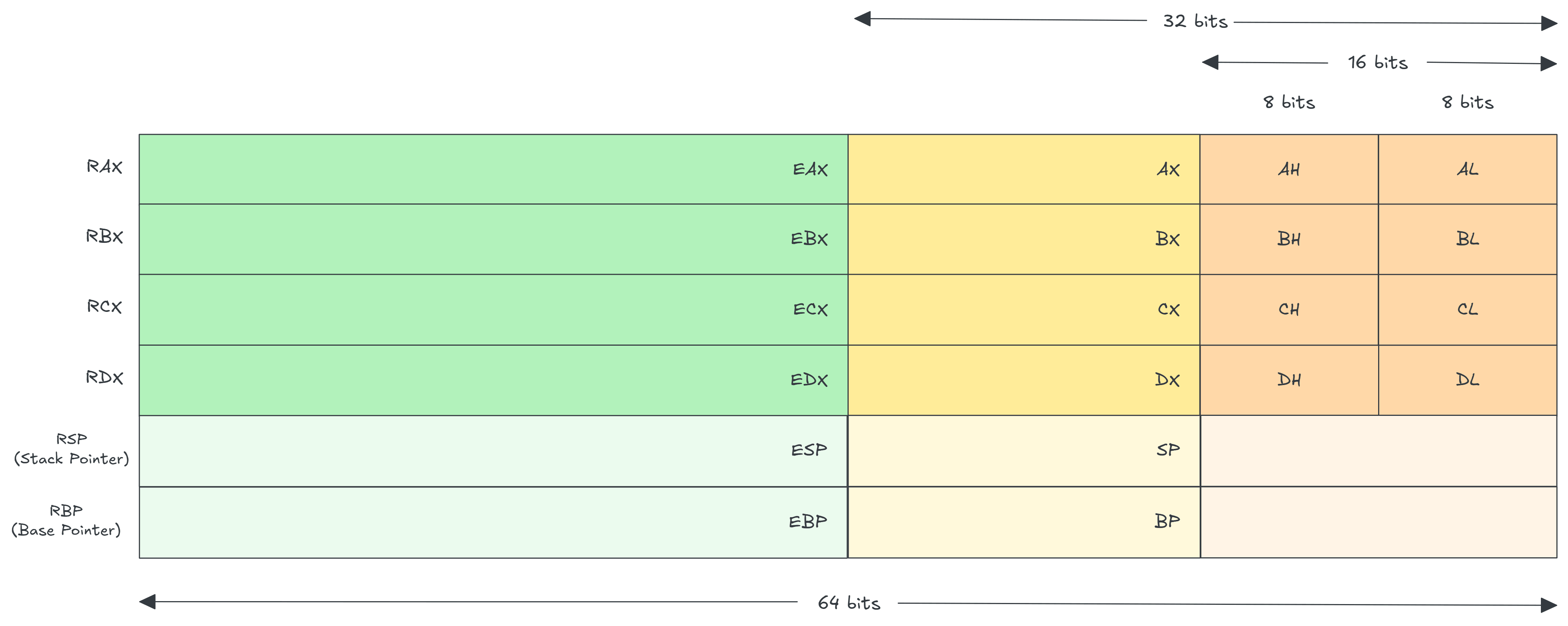
Accessing data from main memory is relatively slow the execution program. To increase speed, frequently used data is stored in CPU registers. Register are small internal and high speed memory storage location inside processor. The registers store data elements for processing without repeatedly access to the memory.
General purpose register
General Purpose Register (GPR) use for arithmetic, logical and other operation.
These is 4 common GPR use for arithmetic and logical operations, depends base on their size:
AX→accumulator register (primary accumulator), use in input/output and most arithmetic operations. (RAX,EAX,AX,AH,AL)BX→base register, use in indexed addressing. (RBX,EBX,BX,BH,BL)CX→count register, store the loop count in iterative operations. (RCX,ECX,CX,CH,CL)DX→data register, store the loop count in iterative operations. (RDX,EDX,DX,DH,DL)
AMD64 and x86_64 add 8 more general purpose registers, R8, R9, R10, R11, R12, R13, R14, and R15.
Special purpose register
Special Purpose Register is a type of register in a processor that is designated for specific tasks.
Program Counter or Instruction Pointer, is one of these special purpose registers use to store the address of the next instruction to execute.
1
2
3
4
RIP → 0x123abc

Memory Address    Instruction
0x123abc          mov rax, 5
Control register
Control register are a subset of special-purpose register, use for CPU configuration and memory management.
There is 3 type of control register, also depends base on their size:
- Pointer Register
- storing memory addresses for accessing data or instructions, instead of storing the data itself.
- Instruction Pointer
→store address of the next instruction to execute. (RIP,EIP,IP) - Stack Pointer
→store address to the stack memory. (RSP,ESP,SP) - Base Pointer
→referencing address location on stack memory. (RBP,EBP,BP)
- Index Register
- used to help calculate memory addresses, typically when accessing elements in arrays and strings.
- Source Index (
RSI,ESI,SI) - Destination Index (
RDI,EDI,DI)
- Flag (status register)
- store information / status bits (flag) describing the result of operations and controlling certain CPU behavior.
- CF (Carry Flag)
→Set if an arithmetic operation generates a carry or borrow. - ZF (Zero Flag)
→Set if the result is zero. - OF (Overflow Flag)
→Set if a signed arithmetic overflow occurs.
Memory
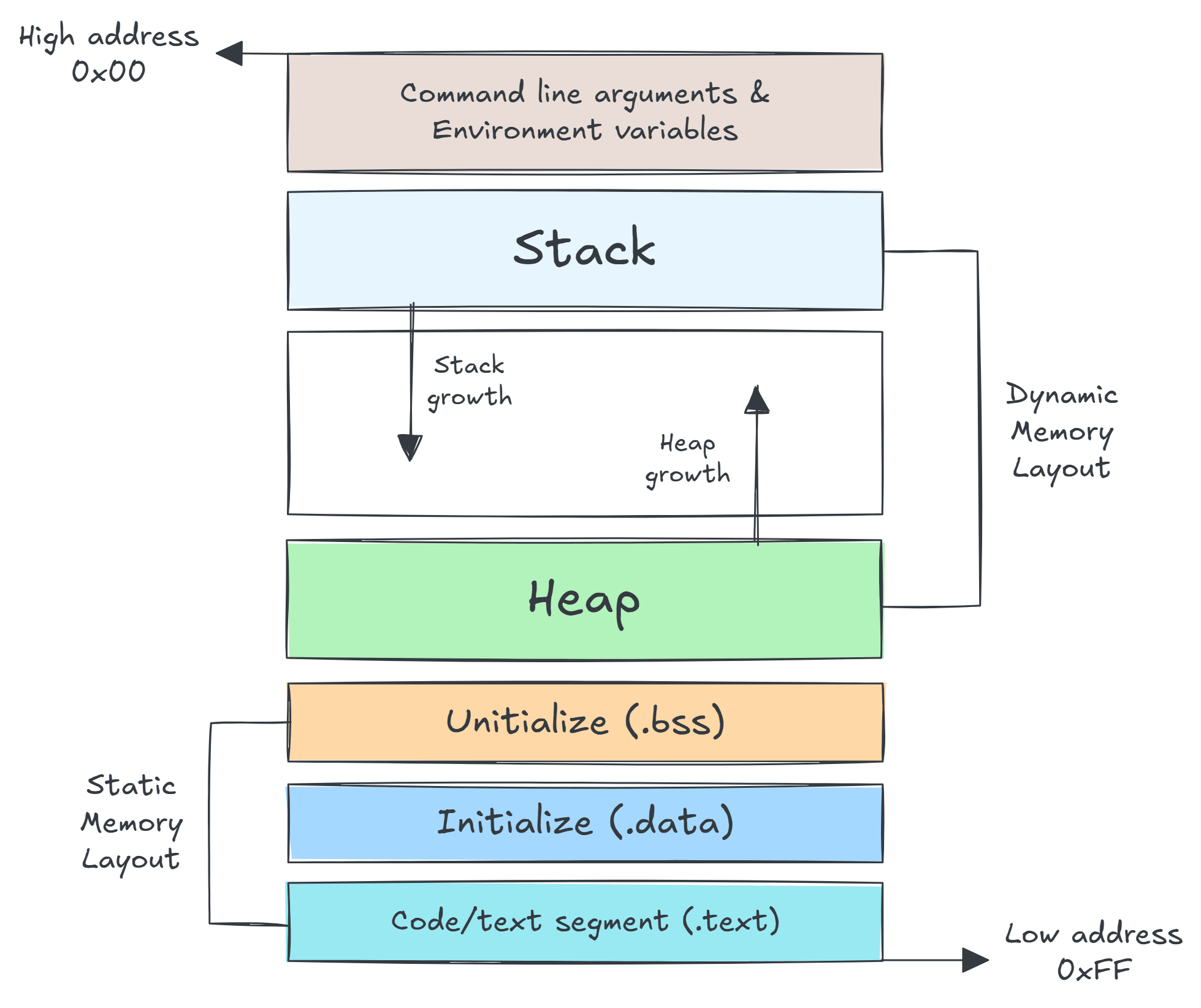
Each segmented memory is divided into several groups based on specific data types. Each data in memory has its own address with the format segment:offset
1
Physical Address = (segment × 16) + offset
segment→identifies a block of memoryoffset→identifies a position within that block
For example:
- Segment
→0x123 - offset
→0xabc - Physical address
→0x123 × 0x10 + 0xabc = 0xcec
There’s 2 main ways bytes data ordered in memory are:
- Little endian (least significant byte first)
1
2
3
4
5
6
7
 memory dump:
 123:abc 78 56 34 12

 Memory: 78 56 34 12
 segment address: 0x123
 offset address: 0xabc
 actual value: 0x12345678
- Big endian (least significant byte first)
1
2
3
4
5
6
7
 memory dump:
 123:abc 12 34 56 78

 Memory: 78 56 34 12
 segment address: 0x123
 offset address: 0xabc
 actual value: 0x12345678
Memory layout divided into 4 groups:
- Data segment
- represent by
.dataand.bsssection used to declare memory region where data are store for the program (global/static storage).
- Code segment
- represent by
textsection used to store instruction code in memory.
- Stack
- contain data value passed to subroutine or function within the program.
- Heap
- used for dynamic memory allocation and manage at runtime also slower than stack.
Subroutine
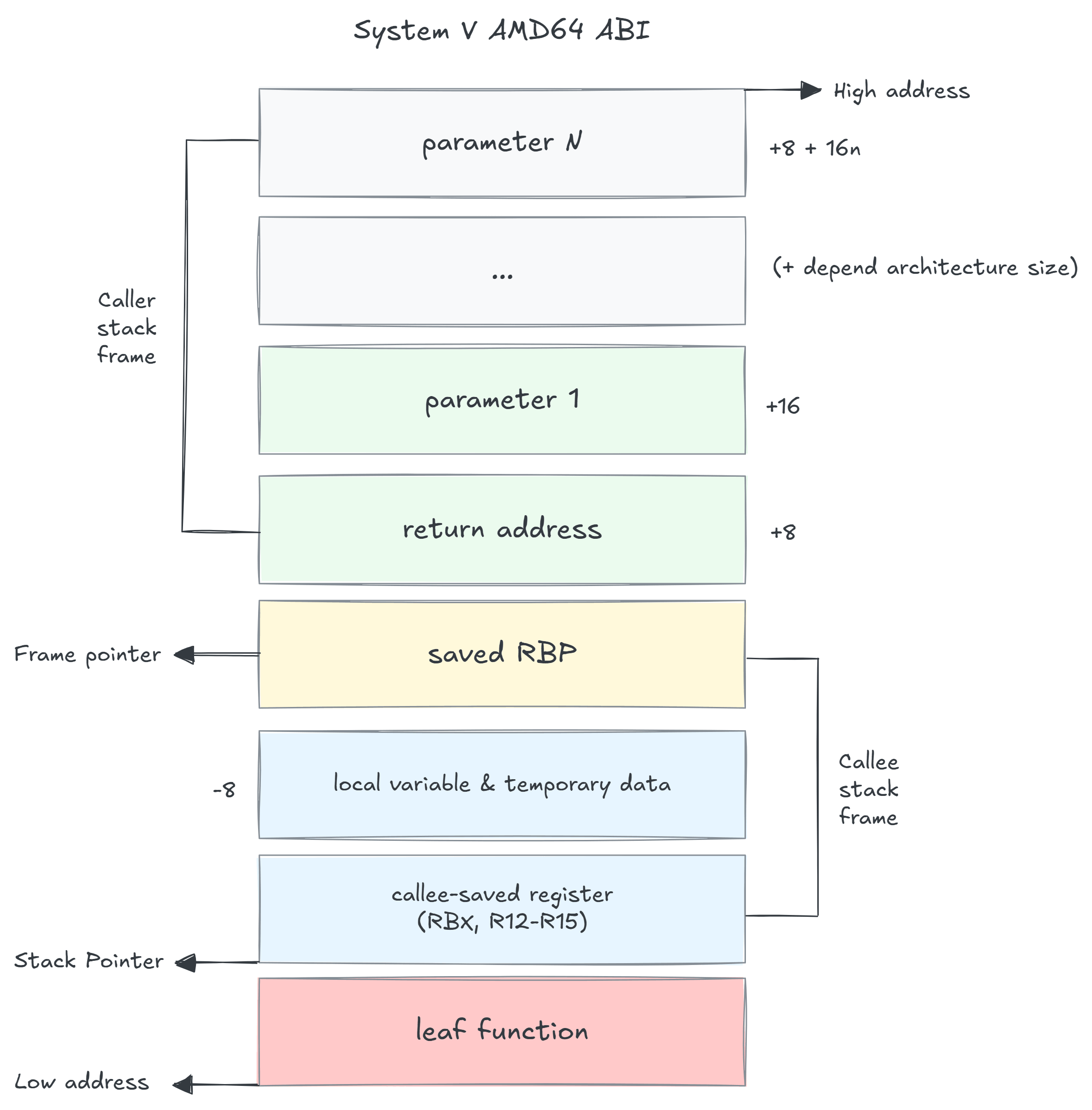
Unlike high level programming, programmer need aware of memory management details. In many cases, data used by a subroutine or function must be manually allocated on the stack.
The structure of a subroutine, often called a stack frame, depends on both the hardware architecture and the operating system’s Application Binary Interface (ABI).
The ABI is various rules for program such as calling convention, parameter handling, register usage, return value handing and other low level details.
For this example we use System V AMD64 ABI because which is standard use by most Unix/Linux OS on x86_64 system.
C code:
1
2
3
4
int add(int a, int b) {
    int result = a + b;
    return result;
}
Assembly code:
1
2
3
4
5
6
7
8
9
10
11
12
13
14
15
16
17
18
19
20
21
22
23
add:
    push rbp        ; save caller's base pointer
    mov rbp, rsp    ; create new stack frame

    sub rsp, 16     ; allocate 16 bytes for local variable

    mov DWORD PTR [rbp - 4], edi    ; int a
    mov DWORD PTR [rbp - 8], esi    ; int b

    mov eax, DWORD PTR [rbp - 4]    ; eax = a
    mov eax, DWORD PTR [rbp - 8]    ; eax += b

    mov DWORD PTR [rbp - 12], eax   ; int result = eax

    mov eax, DWORD PTR [rbp - 12]   ; return result

    ; return type 1
    leave
    ret

    ; return type 2
    ; mov rsp, rbp
    ; pop rbp
Stack frame layout:
1
2
3
4
5
6
7
8
9
10
11
12
13
14
15
Higher Address
+------------------+
| Return Address   | <- [rbp + 8]
+------------------+
| Saved RBP        | <- [rbp]
+------------------+
| result           | <- [rbp - 12]
+------------------+
| b                | <- [rbp - 8]
+------------------+
| a                | <- [rbp - 4]
+------------------+
| Unused/Padding   |
+------------------+
Lower Address
🐛 Debug
In modern software development, assembly language is rarely used directly for writing full programs, except in specific cases such as low-level systems programming tied closely to hardware constraint.
Modern high-level languages are generally more productive and supported by highly optimized compilers, so most developers rely on them instead of writing assembly by hand.
However, assembly is still important in areas like operating systems, security research, reverse engineering, and low-level optimization.
For this reason, having debugging tools that can inspect and step through assembly code remains valuable, even if most debugging is done at the source-code level.
There is a lot of popular debugger out there like GDB, LLDB, WinDbg, OllyDbg and x64dbg.
For this tutorial we use GDB and create file name debug.c
1
2
3
4
5
6
7
8
9
10
11
12
13
14
15
16
17
18
19
20
21
#include <stdio.h>

int multiply(int a, int b) {
    int result = a * b;
    return result;
}

int add(int x, int y) {
    int sum = x + y;
    return multiply(sum, y);
}

int main() {
    int a = 5;
    int b = 3;

    int result = add(a, b);

    printf("Result = %d\n", result);
    return 0;
}
🚀 Compile with debug symbol
-g→enables debugging symbols-O0→disable optimization (important for clean debugging)
start debugging
1
2
3
4
$ gdb ./debug

# set this into intel syntax
(gdb) set disassembly-flavor intel
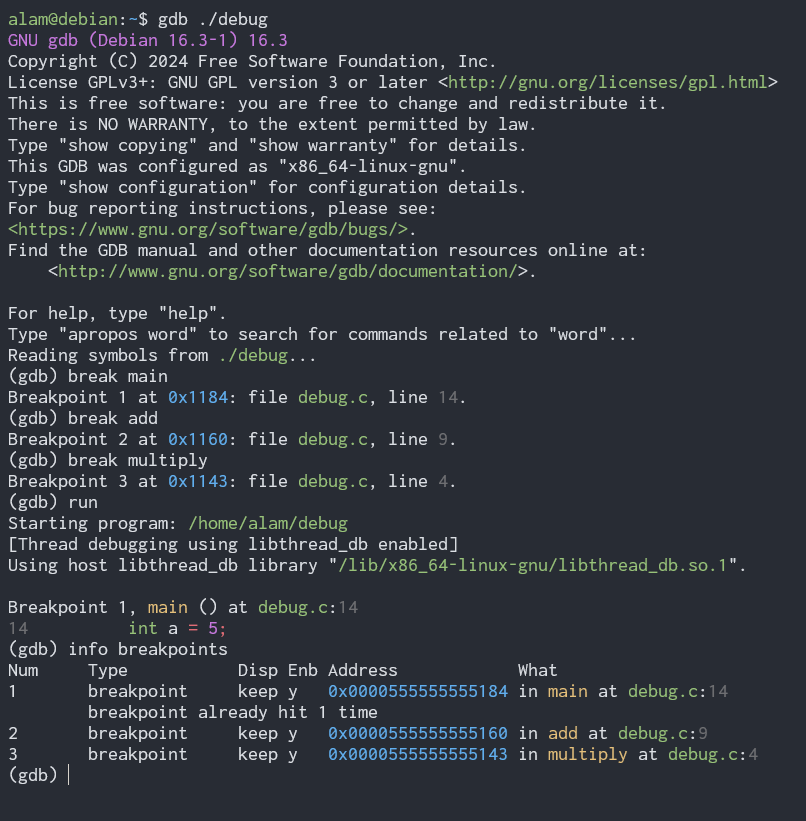
Breakpoints
Breakpoint is a designated pause point in your code that forces the program execution to halt allow to inspect and evaluate the code.
useful command:
1
2
3
4
5
6
7
8
# set breakpoint
(gdb) break <subroutine>

# start debugging
(gdb) run

# check breakpoints
(gdb) info breakpoints
Register inspection
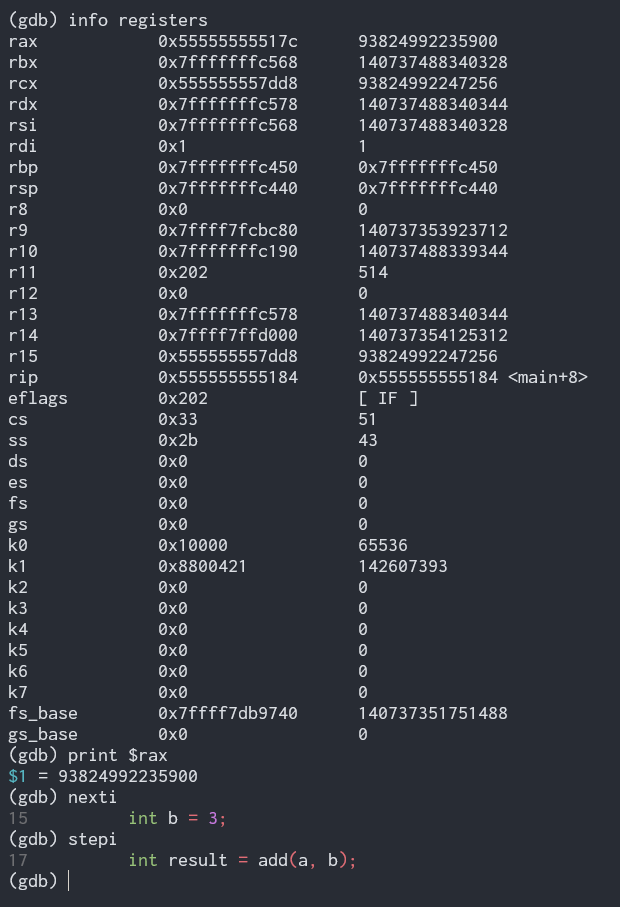
after hitting break point you can check all register
1
2
3
4
5
6
7
8
9
# view all registers
(gdb) info registers

# check specific register
(gdb) print <$register>

# step instruction
(gdb) stepi
(gdb) nexti
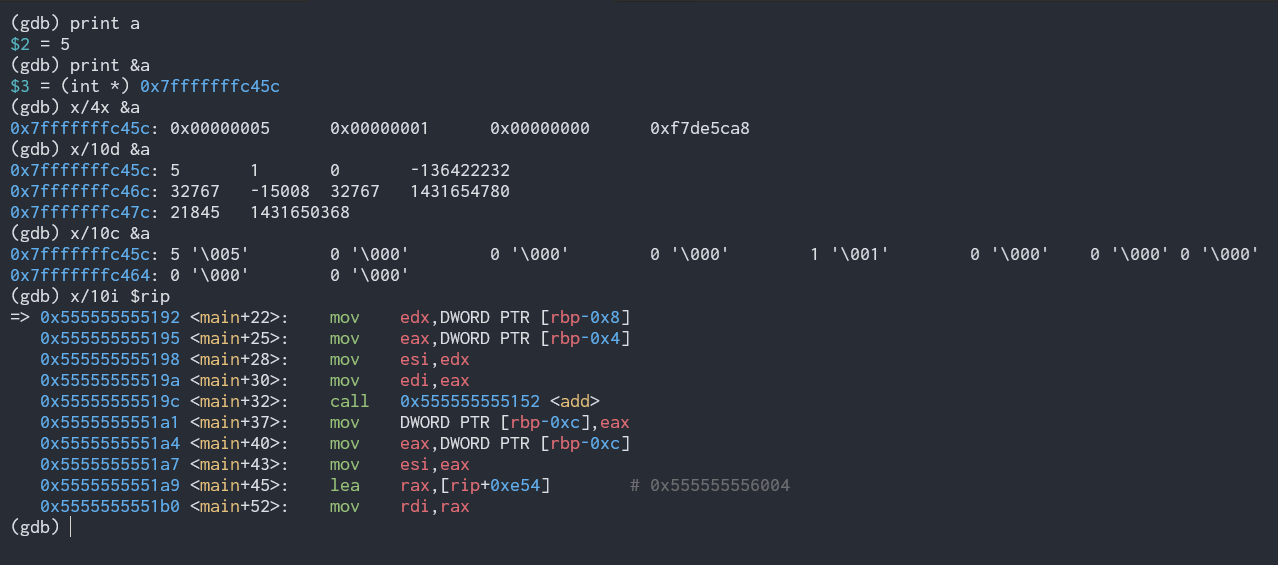
Memory inspection
check memory with this commands
1
2
3
4
5
6
7
8
9
10
11
# print variable in memory
(gdb) print <variable>
(gdb) print <&variable>

# examine memory
# x → examine memory
# /4x → 4 words in hex
(gdb) x/4x <&variable>
(gdb) x/10d <&variable> # decimal
(gdb) x/10c <&variable> # char
(gdb) x/10i <$register> # instruction
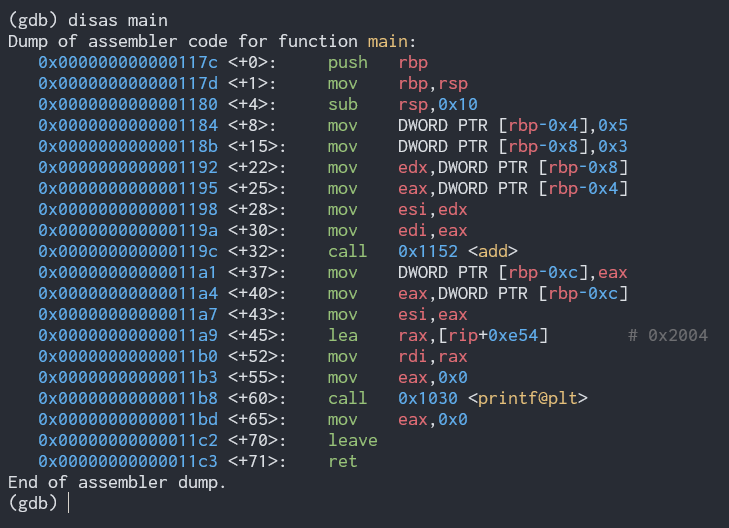
Disassembly
view c code into assembly code.
1
2
(gdb) disassemble main
(gdb) disas main
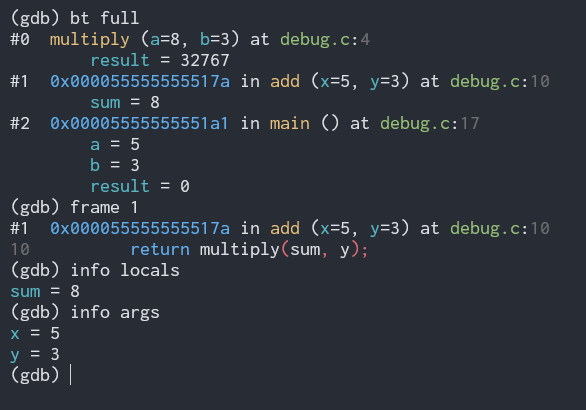
Stack tracing
view call stack
1
2
3
4
5
6
7
8
9
10
(gdb) backtrace
(gdb) bt

# full stack with local
(gdb) bt full

# move between stack frames
(gdb) frame <number>
(gdb) info locals
(gdb) info args
🧭 Advance topic
After learning the fundamentals, you can move on to more advanced topics such as:
- Compiler internal and optimization
- CPU architecture, mode, privilege level (syscall, context switching)
- Memory management (page, PIC, TLB, virtual memory)
- Parallel programming (multithread, atomic operation, SIMD and vector programming)
- System programming (embedded system, os/kernel dev, interrupt and exception)
- Security (binary analysis, exploit dev, reverse engineering, return oriented programming)